A financial planning team at a Fortune 50 company wanted to use an AI agent for a simple workflow: answer very specific questions from a giant Excel The problem A financial planning team at a Fortune 50 company wanted to use an AI agent for a simple workflow: answer very specific questions from a giant Excel spreadsheet: quickly enough to be useful, and accurately enough to trust.
The spreadsheet looked like what real institutions actually run on:
100+ tabs wide tables, merged cells, pivots, hidden sheets repeated values and lots of empty space GPT 5.* is marketed as having strong document understanding, and for many file types it delivers. However, when you upload a large Excel file to a frontier model, the model typically serializes the entire workbook into its context window: every tab, every cell, every merged region. For a 100+ tab workbook, this means the model is either truncating data silently (losing sheets you actually need), or spending most of its context and reasoning capacity just parsing structure rather than answering your question. The issue is that brute-force ingestion doesn't scale to the size and messiness of real enterprise workbooks.
Even with strong frontier models, spreadsheet workflows fail because the agent can’t consistently retrieve the right subset of a large, messy workbook within time and context limits. That’s why we built ReadSpreadsheet: a purpose-built action* for agents that need to work with large or messy Excel files (say over 100 tabs of Excel sheets!)
*Actions in Credal parlance are opinionated LLM Tools also subject to governance and security controls
We ran the same eval suite across three GPT generations, once with Read Spreadsheet enabled, once without.
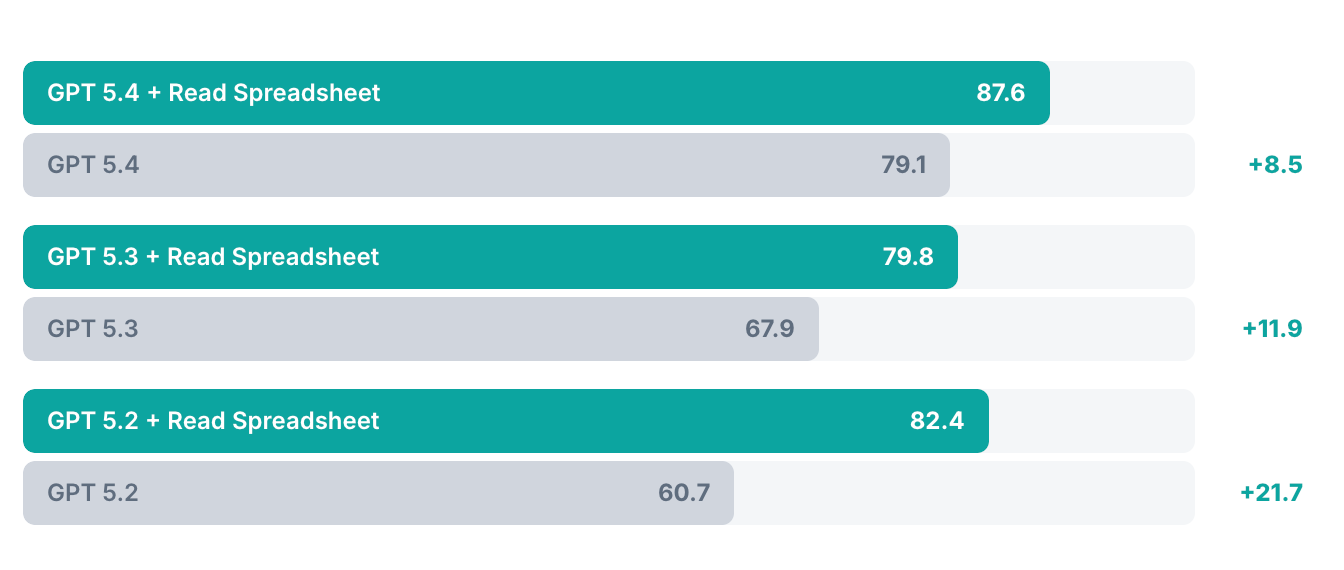
The results speak for themselves. We tested an identical agent configuration using GPT models in two conditions: with and without the Read Spreadsheet action. Across three model generations, ReadSpreadsheet consistently lifted eval accuracy, from a +8.5 point gain on GPT 5.4 (79.1 → 87.6) to a striking +21.7 point improvement on GPT 5.2 (60.7 → 82.4).
The older the model, the bigger the lift, suggesting that purpose-built tooling compensates most where a model's native file handling struggles hardest with the size and messiness of real enterprise workbooks. Beyond accuracy, the practical difference was even starker: without ReadSpreadsheet, the agent frequently timed out entirely, never returning an answer at all. This is what kills real-world adoption, where we want to provide the most complete experience using Credal with any document type.
When do you need this?
GPT 5.2 does do some internal compaction when processing files, but it's general-purpose, it may not know that rows 120-620 all say "N/A" and can be collapsed, or that only 3 of 100 tabs are relevant to your question. ReadSpreadsheet applies spreadsheet-specific intelligence that a general-purpose model can't. Most spreadsheet failures happen because agents either:
ReadSpreadsheet solves this with two ideas:
Instead of feeding the whole workbook to the model, ReadSpreadsheet does a lightweight search to identify relevance:
Large spreadsheets blow up context limits, not because they're conceptually hard, but because they're verbose and repetitive. Once the relevant sheet is identified, ReadSpreadsheet compresses it so the model sees structure + signal. It does this in two ways:
Preserve the skeleton: Keep headers, section boundaries, and representative samples. Trim long stretches of repetitive or empty cells that don't change the meaning.
Collapse repetitive values: Instead of emitting the same token 500 times, use compact representation:
Instead of: N/A, N/A, N/A, N/A… Returns: "N/A" appears in rows 120–620
This preserves the information (what values exist and where) while dramatically reducing output size.
Our customers manage critical infrastructure and serve millions of customers. To make decisions, they face frontier problems that require a lot of data that might involve 100+ tabs of spreadsheets, legacy formats and years of accumulated domain knowledge.
GPT-5.* is a strong foundation for agents—but tools still determine outcomes. The quality difference happens because of its targeted retrieval + spreadsheet-aware compression, so the model spends its attention budget on the right cells.
If spreadsheets are part of your team's core workflows, ReadSpreadsheet is how you close that gap.

One platform for all agents. Full visibility for admins, full access for teams.

One platform for all agents.
Full visibility for admins, full access for teams.